

Last updated: 10 November 2026
Delete your account
You can delete your account in the app, or by email if you can't open it. This page works even if the app is uninstalled.
1. Delete your account in the app
- Open Din Chariya and go to Settings.
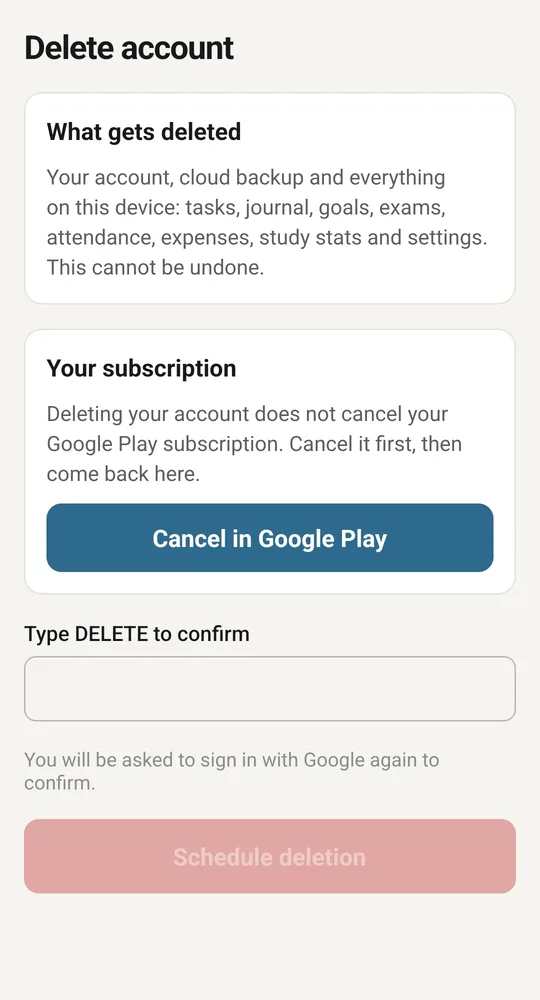
- Tap Delete account, the red row at the end of the list.
- If you signed in with Google, you are asked to sign in with Google again. If you use email, enter your password.
- Type DELETE, then tap Delete my account.
Deletion finishes within 24 hours at most. When you delete inside the app, the app also erases its data on that phone.
Without an account, the same row says Erase data on this device and removes everything stored on that phone.
2. If you have a paid plan
Deleting your account does not cancel your Google Play subscription. Cancel it first in Google Play, under Payments and subscriptions. The app will not delete the account while the plan is still set to renew.
After you cancel, you choose when to delete:
- Delete everything now. Your plan ends at once and any paid time left is lost.
- Delete when my plan ends. You keep your plan until it runs out, and deletion happens about a day after.
To change your mind about a scheduled deletion, open Delete account again and tap Cancel scheduled deletion. You can do this any time before the date.
3. If you can't open the app
Email dinchariya.support@gmail.com from the address on your account, with the subject "Delete my Din Chariya account". Tell us your name and, if you know it, your account ID. We will check that the request comes from you, delete the account, and reply when it is done.
We do this within 5 to 7 business days.
If you only want your screen-time history deleted, email us the same way. In the app, Settings, Privacy and security, Request deletion of my usage data writes the email for you.
4. What is deleted
- Your sign-in account.
- Everything synced to your account: tasks, journal, goals, medicines, attendance, expenses, notes, settings, study statistics, and messages and gifts from the Din Chariya team.
- Your AI usage records and allowance counters.
- Your screen-time minutes.
- Your wallet, coins and XP.
- Your subscription event records and your RevenueCat customer record.
- Any vault files that an older version of the app backed up to your account.
5. What stays
- A small record with a one-way hash of your account ID, the status and the dates. It has no name and no email. It proves that the deletion happened and stops an old sign-in from bringing the account back.
- One-way hashes of the phone's device identifier and of the accounts created on it, so the two-accounts-per-phone limit still applies.
- The log of messages the Din Chariya team sent you, with your name, email and account ID removed.
- Copies in your own Safe folder on your phone. Delete that folder yourself.
- Data on your phone, if we delete your account by email. It stays until you sign out or uninstall the app.
- Your Google Play subscription. Cancel it in Google Play. Deleting the account does not cancel it.
- Google Play purchase records, which stay with Google.
6. More information
See the privacy policy for how data is kept, and the terms of service for what happens to a subscription when an account is deleted.